Event Agenda Management Software

Build Your Conference Agenda and Update It in a Few Clicks

Plan every track, room, and speaker in one window. Drag sessions to new slots on a calendar, or edit dozens at once in a worksheet. Every update reaches your website and event app as soon as you save.

Trusted By Top Organizations. Recognized by Gartner & G2.

Everything You Need to Build, Edit, and Publish Your Event Schedule

vFairs event agenda software covers setup, bulk edits, seating, and publishing, so your whole agenda lives on the platform that runs your event.

Session Builder

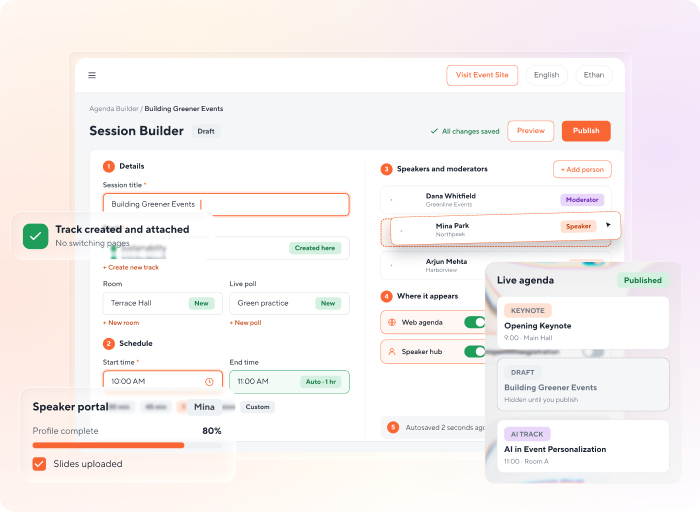
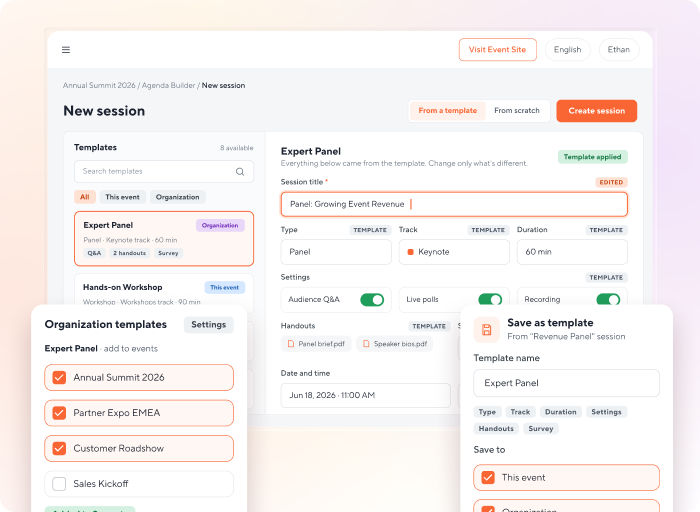
Set Up a Complete Session Without Switching Pages

  • Create new tracks, rooms, surveys, and polls right inside the event agenda builder. Each one attaches to the session right away.
  • Assign speakers and moderators to the session, then drag them into the order you want. Speakers complete their own profiles and materials in the separate speaker portal.
  • Choose where each session appears, from the web agenda and mobile app to the speaker hub and registration form.
  • Your progress saves as you type, and drafts stay off the live agenda until you publish.
  • Set a start time, and the end time fills in one hour later. Adjust it if the session runs longer or shorter.
Speaker Management
set-up-a-complete-session-without-switching-pages
Session Templates

Reuse Session Setups Across Events With Templates

  • Save a session’s setup as a template, including its type, track, duration, settings, handouts, and survey.
  • Start each new session from a template or from scratch, then edit only what’s different.
  • Save templates to one event, your whole organization, or both.
  • Add organization templates to as many events as you need from your organization settings.
reuse-session-setups-across-events-with-templates
Worksheet Editing

Update Dozens of Sessions in One Pass

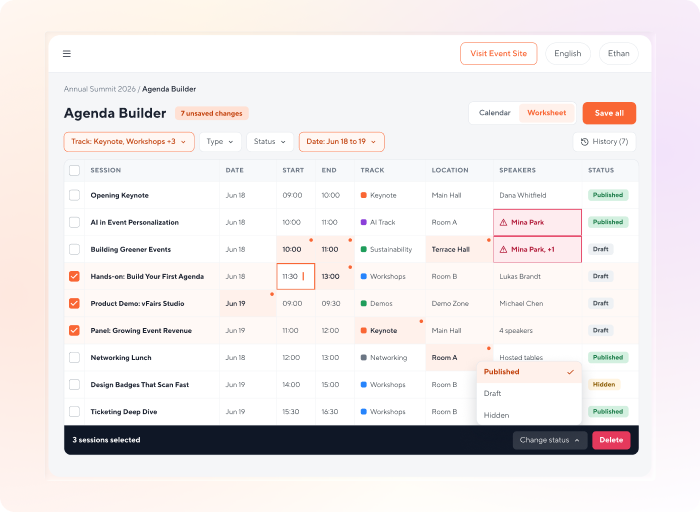
  • Change dates, times, tracks, locations, and speakers across many sessions in one grid.
  • Give every row its own values, so you can reshuffle a whole day of your schedule in one sitting.
  • See a warning when a speaker lands in two sessions at the same time.
  • Undo any single change from the history, or filter by track, type, status, or date.
  • Select several sessions in the list to change their status or delete them in one action.
update-dozens-of-sessions-in-one-pass
Calendar View

Drag Sessions Into Place With a Visual Event Schedule Maker

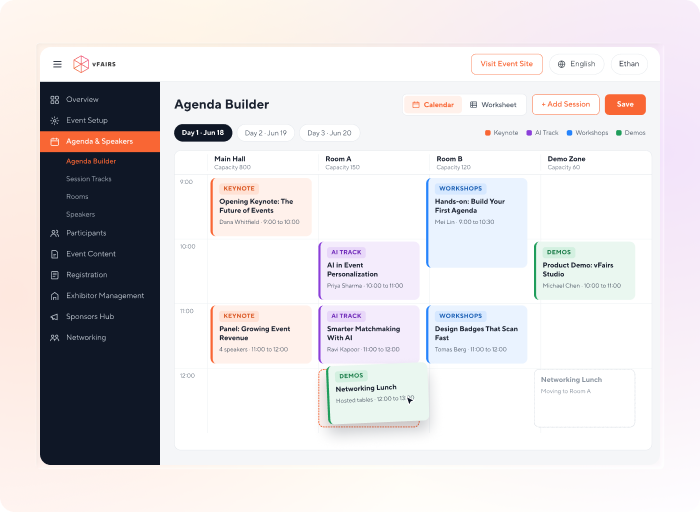
  • See your event schedule by day, week, month, or a custom date range.
  • Drag a session to a new slot, and its date and time update with it.
  • Click any open slot to add a session with the date and time already filled in.
  • Filter by track, location, or speaker to check one part of the program.
drag-sessions-into-place-with-a-visual-event-schedule-maker
Agenda Auto-Sync

Auto-Sync Your Agenda Across Your Website, Event Platform, and Event Agenda App

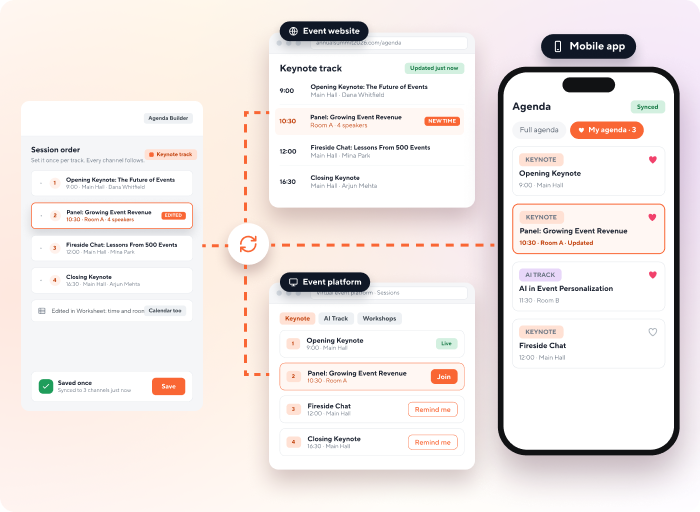
  • Set the session order within each track once. It carries to your landing page, session listing, and mobile app.
  • Edits you make in the worksheet or calendar show up wherever your agenda appears.
  • Attendees see the latest times, rooms, and speakers on your event website and in the mobile app.
  • Save a change once, and every agenda view updates. No need to edit each channel by hand.
  • Attendees can browse the full agenda in your conference agenda app and favorite the sessions they plan to attend, building their own personal agenda.
Mobile Event App
auto-sync-your-agenda-across-your-website-event-platform-and-event-agenda-app
Reserved Seating

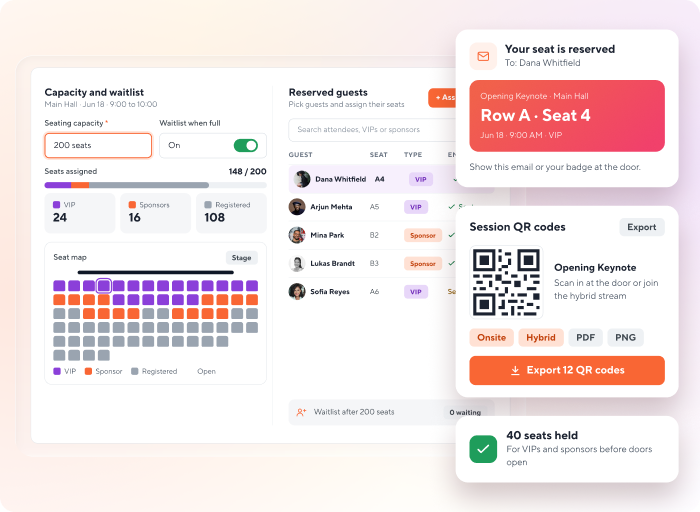
Hold Seats for VIPs and Sponsors Before Sessions Fill Up

  • Set a seating capacity for each session, with a waitlist once it’s full.
  • Pre-assign seats to the guests you choose. Each one gets an email confirming their seat.
  • Track how many seats are assigned out of the total as you go.
  • Export session QR codes for onsite and hybrid sessions.
hold-seats-for-vips-and-sponsors-before-sessions-fill-up
Agenda Import

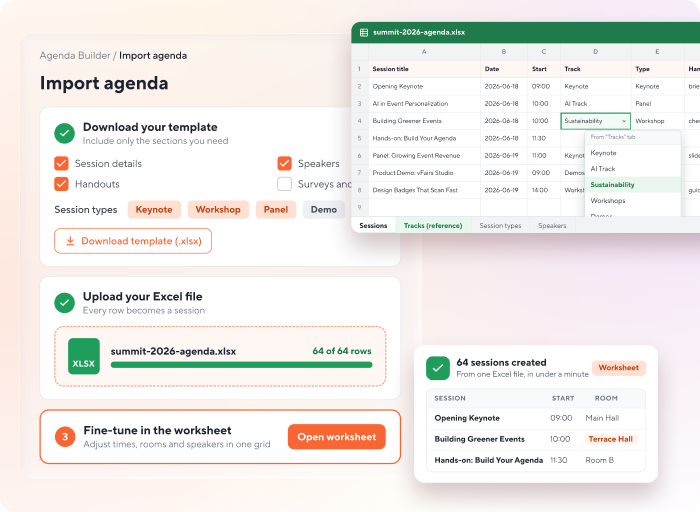
Bring Your Whole Agenda Over From a Spreadsheet

  • Download an import template with only the sections you need, such as handouts or specific session types.
  • Fill it in as an Excel file and upload it to create sessions in bulk.
  • Copy track names from a reference tab in the template, so nothing gets mistyped.
  • Fine-tune the imported sessions afterward in the worksheet.
bring-your-whole-agenda-over-from-a-spreadsheet
Quote

“We had to find the best possible solution and partnering with vFairs we collaborated with what we wanted to do and created a similar show experience in the virtual world. Together we came up with a product that surpassed all expectations.”

debbie-bellantoni
Debbie Bellantoni
  • Events Operations & Planning Manager at Land n Sea
Quote

“It’s a full-fledged platform for hosting a virtual conference, workshop or learning curriculum. What I like most is the all-in-one experience, from registration to data and stats, including live session moderation. Customer service is always excellent.”

michele-dagher
Michèle Dagher
  • Creating Shared Value Manager at Nestle
Quote

“Today we had our first IBM Services virtual summit with vFairs and the experience was very good overall. The platform excels in live chat, audio and visual chats, and analytics that help us retarget clients after the event.”

oussama-1
Oussama Barkia
  • IBM, Marketing Leader
Quote

This is our second time using vFairs and once again it was a great experience. The attendees loved the photo booth and photo gallery features. We will be using vFairs next year for sure.

ignacia-2
Ignacia T.
  • Digital PMO
Quote

The gamification, the embedded zoom feature, the chat rooms, and the ease of engagement were all at the top of the list for our attendees and for our team.
emily-knox-2
Emily A.
  • Director Alignment
Explore More With vFairs

Everything Else That Works Alongside Your Agenda

Your conference agenda software sits inside the same platform that runs your speakers, abstracts, registration, and event app.

give-speakers-more-control-over-their-profiles

Speaker Management

Give speakers a portal to complete their profiles, upload materials, and see their assigned sessions.

Learn More
turn-accepted-abstracts-into-agenda-sessions-in-bulk-2

Abstract Management

Run your call for papers, then turn accepted abstracts into agenda sessions in bulk.
Learn More
mobile-event-app-21

Mobile Event App

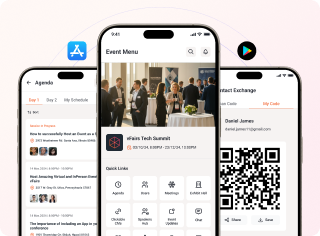
Give attendees an event agenda app with session details, personal agendas, and your floor plan.
Learn More
event-registration-12

Event Registration

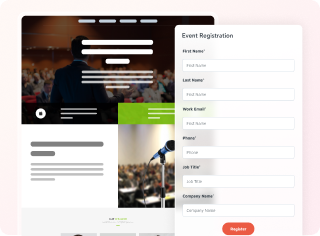
Build custom registration forms and show your sessions right inside the registration flow.

Learn More

Frequently Asked Questions

Is agenda management included in my vFairs plan?

Yes. vFairs event agenda software is part of the event platform, with no separate add-on to buy.

Is there a limit on how many sessions I can add to my agenda?

There's no set limit on sessions in the platform. The number of sessions you can run depends on your plan.

Can I upload sessions in bulk from an Excel spreadsheet?

Yes. Download an Excel import template, choose which sections to include, fill in your sessions, and upload the file to create them in bulk.

Can I keep sessions hidden until they're ready?

Yes. Save a session as a draft and it stays in the Drafts tab, off your live agenda, until you publish it. Your progress also saves automatically as you work.

Can I add moderators the same way as speakers?

Yes. In the session builder's speakers tab, pick an existing moderator from the list or create a new one, and they're added to the session right away.

Will session conflicts be flagged?

Yes, for speakers. When you edit sessions in the worksheet, vFairs warns you if the same speaker is assigned to two sessions at the same time. Wider conflict checks, such as two sessions in the same room at the same time, are on our roadmap.

Can I reuse session setups across events?

Yes. Save any session as a template at the event level, the organization level, or both. Organization templates can be added to multiple events, and each new session can start from a template or from scratch.

Do attendees get an event agenda app?

Yes. Your agenda appears in the vFairs mobile event app. Attendees can browse every session, favorite the ones they plan to attend, and see your latest changes as soon as you save them.

Does it work for in-person, hybrid, and virtual events?

Yes. You can run sessions for all three formats. For onsite and hybrid events, you can also set seat limits, pre-assign seats, and export session QR codes.

What is event agenda management software?

Event agenda management software helps you build, schedule, and publish the sessions for an event. In vFairs, the event schedule builder lets you create sessions with their tracks, locations, and speakers, edit many sessions at once in a worksheet or calendar, and publish one agenda to your landing page, event platform, and mobile app.

Ready to Move 20 Sessions in One Pass?

See the conference agenda builder in action, including the worksheet and calendar view, in a live demo.